
IPv6 and Monitoring
We are all happy when we are able to get IPv6 connectivity for our new servers. In case the network is provided by someone else and some kernel settings you can get in some tricky situations.
With IPv6 there are so many addresses your Laptop and Mobile can have a unique public IPv6 address forever - pretty cool huh? The downside is, it would be pretty easy to trace every connection you ever do back to your device - this really not what you want! When you provide a service this behavior is not so useful. Otherwise there are several ways to autoconfigure your IPv6 configuration, beside DHCPv6 the interesting one is stateless address configuration.
Stateless address configuration means, your server is allowed to construct himself an IPv6 address without the need of DHCPv6 server. Simple explained, a router with IPv6 runs the Router Advertisement daemon. He sends via link local router advertisement (RA) packets and inform others “Hey! I’m the default router for the 2001::/64 network”. This advertisements are sent out at a certain interval and this way your server gets the information what the LAN IPv6 network is.
The RA packets can have some flags:
A: Autonomous Address Autoconfiguration tells your server it should perform a stateless address assignmentM: Managed Address Configuration tells your server it should use stateful DHCPv6 to acquire its address and other DHCPv6 options
With the flag set to A your server will create an IPv6 address in the given network space.
To make your server “untracable” the Privacy Extensions kicks in and basically randomizes and changes your IPv6 address over time.
You can verify the configuration with
sysctl -a | grep use_temp

net.ipv6.conf.VPN.use_tempaddr = 2
net.ipv6.conf.all.use_tempaddr = 2
net.ipv6.conf.default.use_tempaddr = 2
net.ipv6.conf.em1.use_tempaddr = 2
net.ipv6.conf.em2.use_tempaddr = 2
net.ipv6.conf.lo.use_tempaddr = 2
In Ubuntu you can set the kernel settings so they survive a restart set the configuration in
cat /etc/sysctl.d/10-ipv6-privacy.conf

net.ipv6.conf.all.use_tempaddr = 2
net.ipv6.conf.default.use_tempaddr = 2
If you want to set the parameter as default for every new network device set
sysctl -w net.ipv6.conf.all.use_tempaddr=0
sysctl -w net.ipv6.conf.default.use_tempaddr = 0
This setting can also be configured for a specific interfaces, here the command for eth0
sysctl -w net.ipv6.conf.eth0.use_tempaddr=0
If you have the kernel settings set to 2 means prefer privacy addresses and use them over the normal address.
Set the kernel parameter to 0 to disable privacy extensions.
OpenNMS uses SNMP and during the provisioning and discovers IPv6 addresses. For the provisioning there are not a lot of possibilities to figure out if an interface is down or doesn’t exist anymore. If you have Privacy Extentions enabled your server looks somehow like the screenshot below.
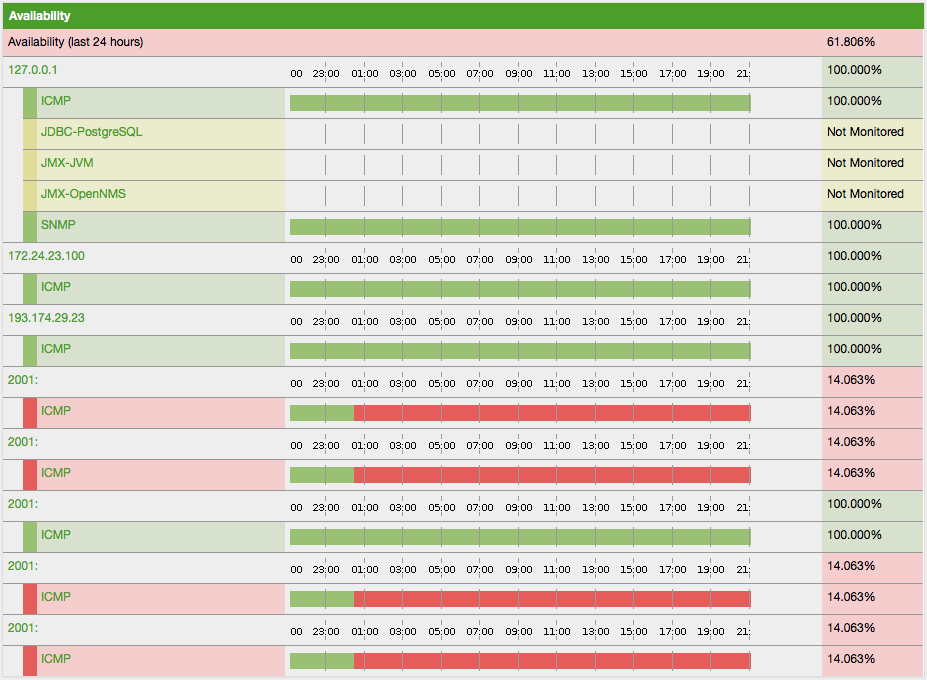
In this situation you can exclude the IP interfaces with an IP match policy or you disable Privacy Extensions on your server.
Links around this topic: